GSM Network: LimeSDR
contents
DISCLAIMER: This procedure is highly illegal in most parts of the world. Be sure to run this in a closed RF environment (also known as Faraday Cage)
- Running a GSM Station with osmo network-in-a-box (sms/audio)
- Running a GSM Station with full osmo (sms/audio/data) [TODO]
Running a GSM Station with osmo network-in-a-box#
For this example we will use the Osmocom GSM Stack in the NITB (Network in a box) mode. In this mode the phones connected to your BTS will be able to call each other and send SMS messages. There is also the Interconnect mode in which the BSC (Base Station Controller) connects to a ISDN or IPBX (for example Asterisk) to manage the connected phones. You can check the different modes here: https://osmocom.org/projects/openbsc/wiki/OpenBSC#Configurations-Modes
For this article I will be using a Ubuntu 18.04 LTS as the operating system, since there are pre-compiled packages from LimeMicro which is very helpful. It should run in any linux distribution provided that it has the required packages and / or you compile the missing ones. I might make a tutorial later about how to install from the source code but for now I will stick to the pre-compiled packages.
Installing the required packages#
The first thing we need to do is to install all required packages. LimeMicro has pre-compiled everything in their PPAs. So let’s add them first:
sudo add-apt-repository -y ppa:myriadrf/driverssudo add-apt-repository -y ppa:myriadrf/gnuradioLet’s also add the osmocom binary builds:
wget https://download.opensuse.org/repositories/network:/osmocom:/latest/xUbuntu_18.04/Release.keysudo apt-key add Release.keyrm Release.keyecho "deb [https://download.opensuse.org/repositories/network:/osmocom:/latest/xUbuntu_18.04/](https://download.opensuse.org/repositories/network:/osmocom:/latest/xUbuntu_18.04/) ./" | sudo tee /etc/apt/sources.list.d/osmocom-latest.listsudo apt-get updateThen we can install required packages:
sudo apt install osmocom-nitb osmo-trx-lms osmo-bts-trx limesuiteThese packages are:
osmocom-nitb=> Network in a Box Package. Contains all needed stuff for managing GSM Networkosmo-bts-trx=> The Base Transceiver Station software that manages how the network packets will be sent.osmo-trx-lms=> The LimeSDR “frontend” for the BTS. This is the piece of software that actually communicates with LimeSDRlimesuite=> The software and driver for the LimeSDR
Updating the LimeSDR Firmware#
It is a good practice to check if your LimeSDR firmware is up to date. To check and update if needed, you only need to run:
LimeUtil --updateIt should do everything that is needed to update
Creating the configuration files#
There are a few files that need to be created. Let’s first start with the OpenBSC config file openbsc.cfg:
!! OpenBSC configuration saved from vty! !password foo!line vty no login!e1_input e1_line 0 driver ipanetwork network country code 901 mobile network code 70 short name HUEHUE long name HUEBRNetwork auth policy accept-all location updating reject cause 13 encryption a5 0 neci 1 rrlp mode none mm info 1 handover 0 handover window rxlev averaging 10 handover window rxqual averaging 1 handover window rxlev neighbor averaging 10 handover power budget interval 6 handover power budget hysteresis 3 handover maximum distance 9999 bts 0 type sysmobts band GSM900 cell_identity 0 location_area_code 1 training_sequence_code 7 base_station_id_code 63 ms max power 15 cell reselection hysteresis 4 rxlev access min 0 channel allocator ascending rach tx integer 9 rach max transmission 7 ip.access unit_id 1801 0 oml ip.access stream_id 255 line 0 gprs mode none trx 0 rf_locked 0 arfcn 100 nominal power 23 max_power_red 20 rsl e1 tei 0 timeslot 0 phys_chan_config CCCH+SDCCH4 timeslot 1 phys_chan_config SDCCH8 timeslot 2 phys_chan_config TCH/F timeslot 3 phys_chan_config TCH/F timeslot 4 phys_chan_config TCH/F timeslot 5 phys_chan_config TCH/F timeslot 6 phys_chan_config TCH/F timeslot 7 phys_chan_config TCH/FThere are several parameters here, but I will only describe the ones you might want to change:
network country code 901mobile network code 70short name HUEHUElong name HUEBRNetworkauth policy accept-allnetwork country code=> That is the MCC of the network operator. It says in which country the operator is operating. For example: 724 is Brazilmobile network code=> That is the MNC of the network operator. It says which network operator it is. Every mobile network operator has its own MNC (some of them have more than one).short name=> The Short name of the network operatorlong name=> The Long Name of the network operatorauth policy=> How we will accept the phones that are trying to connect.
Be careful setting these settings especially with a accept-all policy. If you set to an existing mobile operator, any phone that is close to your LimeSDR will connect to it. The names of the operator (at least in a Android Device) only appear after connecting to it.
That openbsc.cfg file will be used by osmo-nitb software. The next file is osmo-bts.cfg
!! OsmoBTS configuration example!!!log stderr logging color 1 logging timestamp 0 logging level rsl notice logging level oml notice logging level rll notice logging level rr notice logging level loop debug logging level meas debug logging level pag error logging level l1c error logging level l1p error logging level dsp error logging level abis error!line vty no login!phy 0 instance 0 osmotrx rx-gain 40 osmotrx tx-attenuation 50 osmotrx ip local 127.0.0.1 osmotrx ip remote 127.0.0.1 no osmotrx timing-advance-loopbts 0 oml remote-ip 127.0.0.1 ipa unit-id 1801 0 gsmtap-sapi pdtch gsmtap-sapi ccch band 900 trx 0 phy 0 instance 0The only important parameter to take care of here is band. Make sure is the same as in openbsc.cfg file. The next one is osmo-trx.cfg which will be used by osmo-trx-lms:
log stderr logging filter all 1 logging color 1 logging print category 1 logging timestamp 1 logging print file basename logging level set-all info!line vty no login!trx bind-ip 127.0.0.1 remote-ip 127.0.0.1 base-port 5700 egprs disable tx-sps 4 rx-sps 4 rt-prio 18 chan 0 tx-path BAND1 rx-path LNAWThere are not much to change here. If you’re using a multi-port LimeSDR (like LimeSDR USB or PCIe) you can change the parameter tx-path and rx-pathto the desired paths.
Running the software stack#
To get the BTS working, you need to run a few programs. You should run all of them from the folder you created the configuration files.
The first one we should run is osmo-trx-lms . This one should be run as root to enable high priority scheduling (specially needed if you’re running a small SBC like a Raspberry PI).
sudo osmo-trx-lms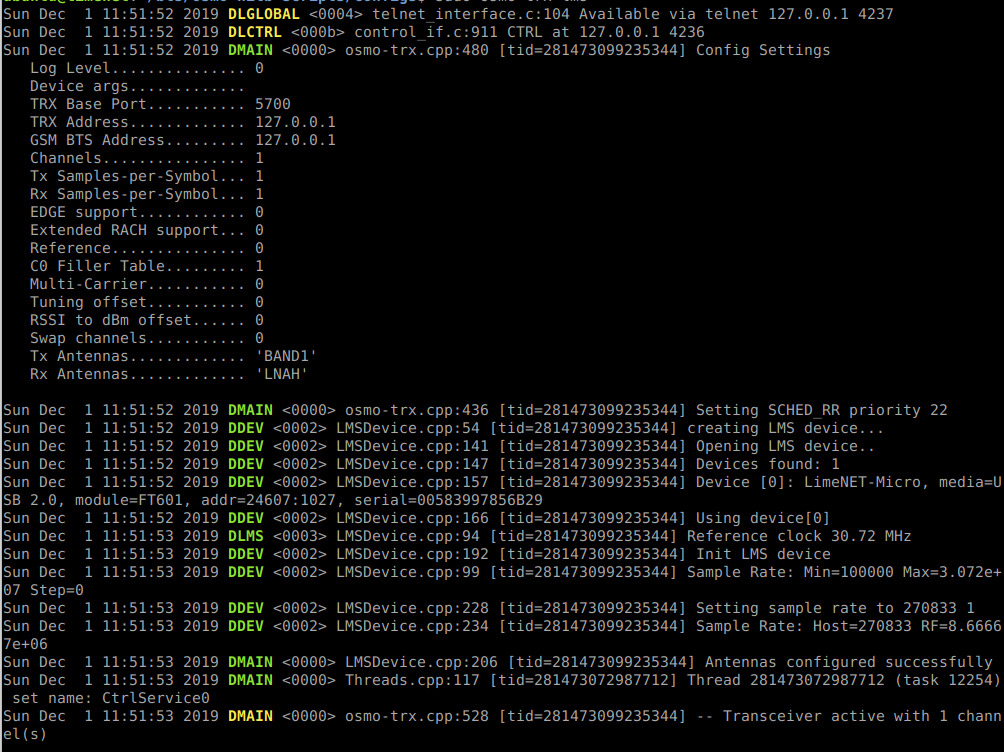
The second one is the osmo-nitb which is the base station controller. This one doesn’t need to be run as root.
osmo-nitb
And the last software is the osmo-bts-trx which handles the transceiver:
osmo-bts-trx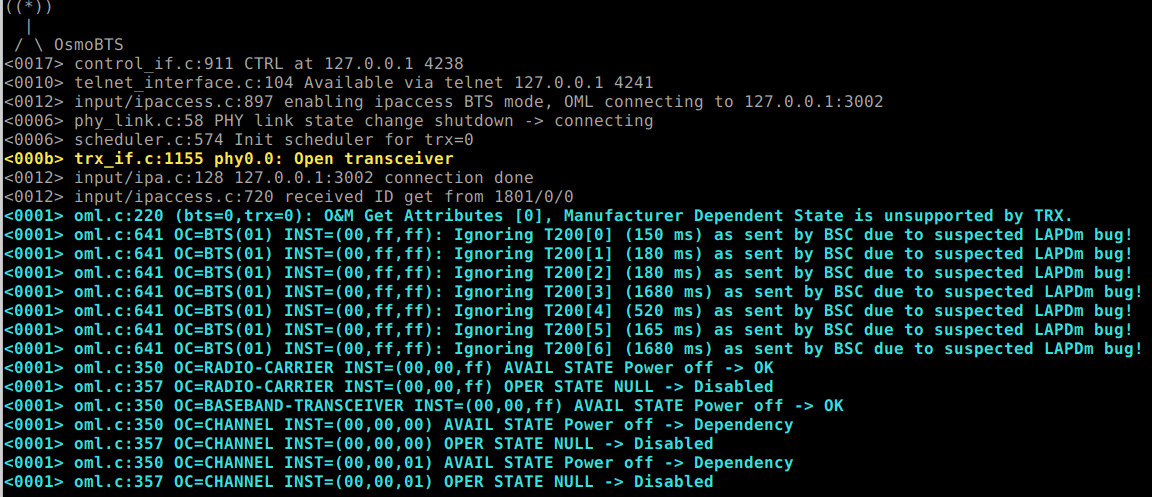
Now your base station should be running.
Testing the Base Station#
The best way to test is to have a custom simcard like this one:

But since we set the BTS to accept-all mode, you can just go to your phone network settings and select the created network. That will work fine if you have an Android phone which allows you to select custom networks:
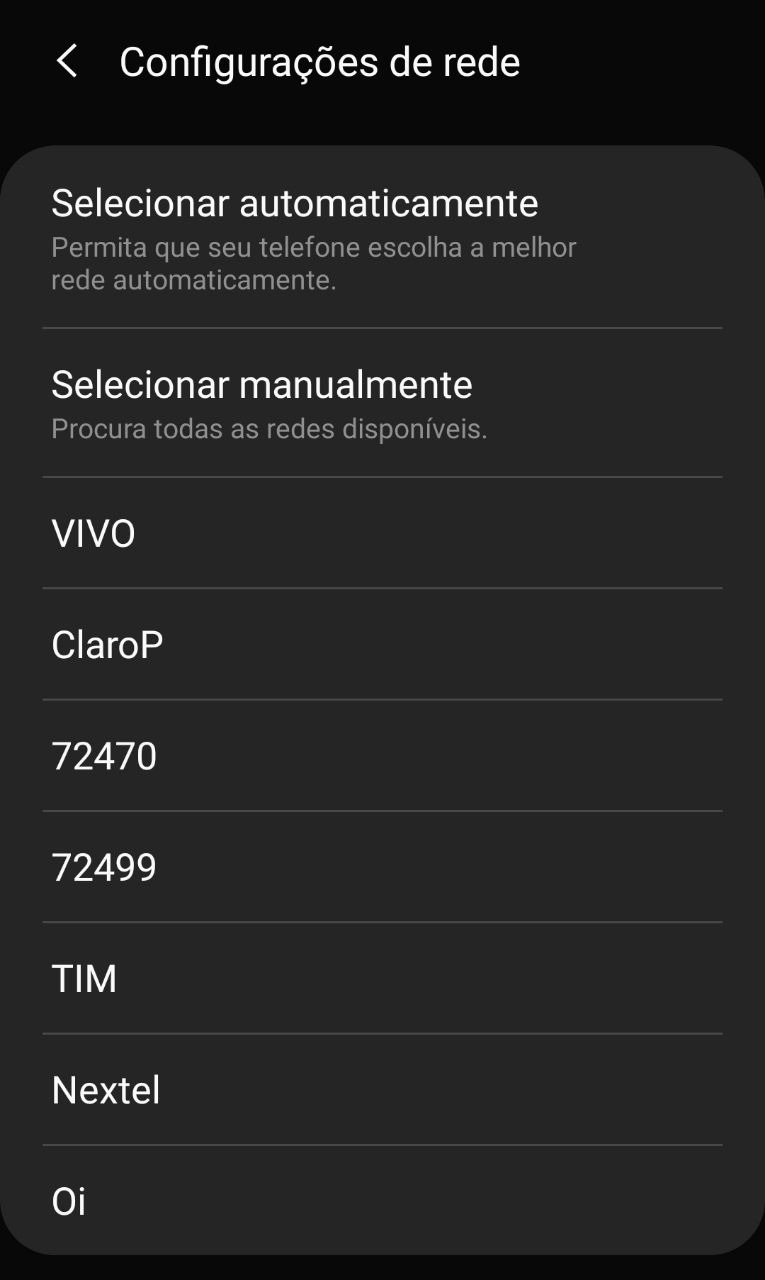
Here is the network I just created with MCC 724 and MNC 70. In some simcards it is required that the MCC is the same as sim country (for example here it only shows if the network is at 724).
After connecting to the network, the name should appear instead of the MCC+MNC code:
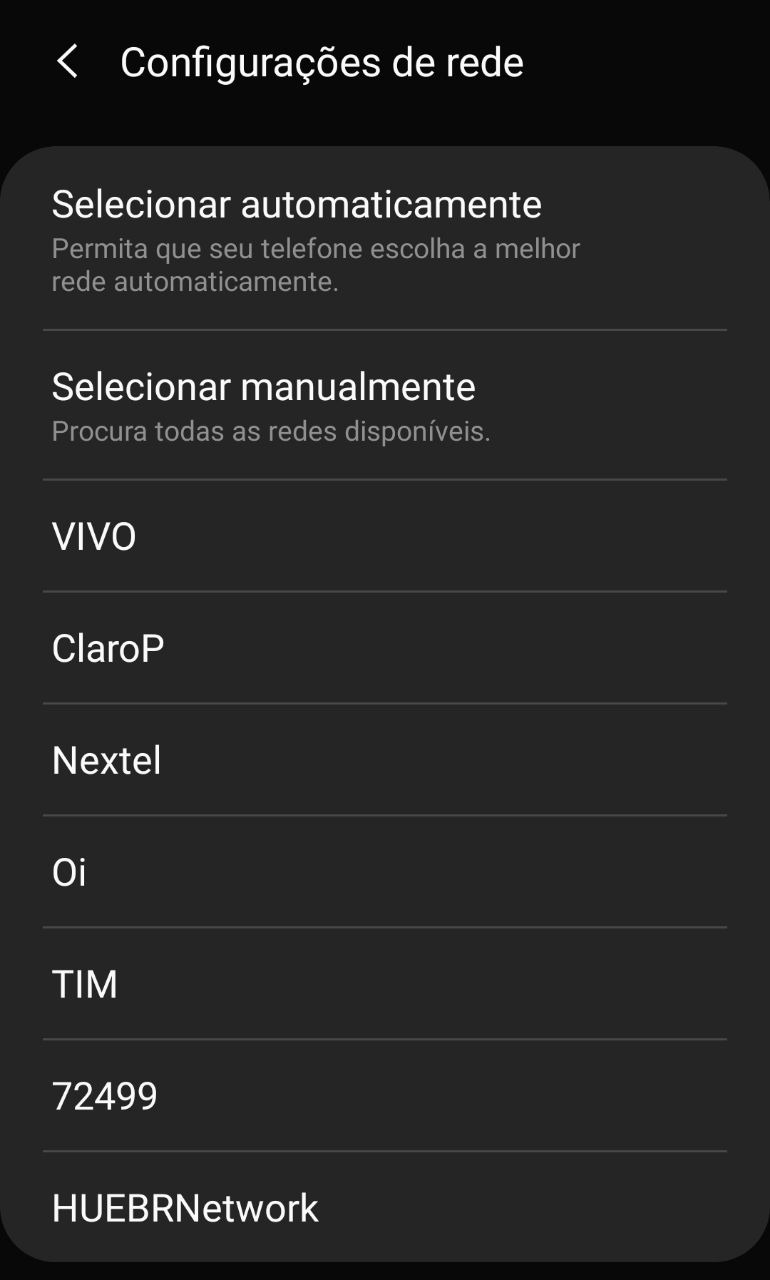
Listing Subscribers#
There is a simple python script to list the subscribers. What it does is to open the sqlite database and do a simple query and print.
#!/usr/bin/env pythonimport sqlite3HLR_DATABASE = "hlr.sqlite3"db = sqlite3.connect(HLR_DATABASE)c = db.cursor()c.execute("SELECT * FROM Subscriber")print("ID\t\tcreated\t\tIMSI\t\t\tTMSI\t\textension\n")while True: subscriber = c.fetchone() if not subscriber: break print(f"{subscriber[0]}\t{subscriber[1]}\t{subscriber[3]:<15}\t\t{subscriber[7]:<10}\t{subscriber[5]}")db.close()The IMSI field is unique to that phone / simcard combination. That’s the number you can use to track a specific user around the world. The extension is the assigned phone number for that specific phone.
Sending SMS#
There are two scripts I found on the internet to send SMS. They basically selects the IMSI from the sqlite database the Osmo stack creates and then connects through the telnet interface to issue the desired commands. One of them is sms_broadcast.py:
#!/usr/bin/env pythonimport telnetlibimport sqlite3import sysimsi = 999999999999999HLR_DATABASE = "hlr.sqlite3"def check_extension(extension): conn.write(b"show subscriber extension %s\n" % extension.encode()) res = conn.read_until(b"OpenBSC> ") if b"No subscriber found for extension" in res: create_subscriber(extension)def create_subscriber(extension): print("No user with excension %s found. Creating new..." % extension) print("Extension: %s, IMSI: %d" % (extension, imsi)) conn.write(b"show subscriber imsi %d\n" % imsi) res = conn.read_until(b"OpenBSC> ") if b"No subscriber found for imsi" in res: conn.write(b"subscriber create imsi %d\n" % imsi) conn.read_until(b"OpenBSC> ") conn.write(b"enable\n") conn.read_until(b"OpenBSC# ") conn.write(b"subscriber imsi %d extension %s\n" % (imsi, extension.encode())) conn.read_until(b"OpenBSC# ") conn.write(b"disable\n") conn.read_until(b"OpenBSC> ")def get_users(): # returns user id list generator db = sqlite3.connect(HLR_DATABASE) c = db.cursor() c.execute("SELECT * FROM Subscriber") for subscriber in c.fetchall(): yield subscriber[0]def send_sms(id, extension, message): conn.write(b"subscriber id %d sms sender extension %s send %s\n" % (id, extension.encode(), message.encode())) res = conn.read_until(b"OpenBSC> ") if b"%" in res: print(res) exit(1)if __name__ == "__main__": try: extension = sys.argv[1] message = " ".join(sys.argv[2:]) except: print("usage: ./sms_broadcast.py extension message") print("This script sends a message from the specified extension (number) to all devices connected to this base station") exit(1) conn = telnetlib.Telnet("127.0.0.1", 4242) conn.read_until(b"OpenBSC> ") check_extension(extension) for id in get_users(): send_sms(id, extension, message)This one is pretty simple to use:
python sms_broadcast.py "source number" "message"This will send an SMS to all connected devices as if it were from the source number.
Another option is to target a single user:
#!/usr/bin/env pythonimport telnetlibimport sysimport randomimport timeimsi = 999999999999999def check_extension(extension): conn.write(b"show subscriber extension %s\n" % extension.encode()) res = conn.read_until(b"OpenBSC> ") if b"No subscriber found for extension" in res: print("Phone with extension %s not found ;(" % extension) exit(1)def check_spam_subscriber(): conn.write(b"show subscriber imsi %d\n" % imsi) res = conn.read_until(b"OpenBSC> ") if b"No subscriber found for imsi" in res: conn.write(b"subscriber create imsi %d\n" % imsi) print(conn.read_until(b"OpenBSC> "))def send(extension, spam_number, message): print("Sending sms from %d..." % spam_number) conn.write(b"enable\n") conn.read_until(b"OpenBSC# ") conn.write(b"subscriber imsi %d extension %d\n" % (imsi, spam_number)) conn.read_until(b"OpenBSC# ") conn.write(b"disable\n") conn.read_until(b"OpenBSC> ") conn.write(b"subscriber extension %s sms sender extension %d send %s\n" % (extension.encode(), spam_number, message.encode())) res = conn.read_until(b"OpenBSC> ") if b"%" in res: print(res) exit(1)if __name__ == "__main__": try: extension = sys.argv[1] repeats = int(sys.argv[2]) message = " ".join(sys.argv[3:]) except: print("usage: ./sms_spam.py extension [num of repeats] message") print("This script sends a message to specified number") exit(1) conn = telnetlib.Telnet("127.0.0.1", 4242) conn.read_until(b"OpenBSC> ") check_extension(extension) check_spam_subscriber() for _ in range(repeats): spam_number = random.randint(1000,9999) send(extension, spam_number, message) time.sleep(2)This one generates a random source number and sends the specified message n times.
python sms_spam.py "target number" "number of times" "message"