HydraBus
contents
Features#
Support many extensions:
- HydraNFC - Hydrabus shield for NFC
- HydraFlash - NAND flash shield
- HydraLINCAN - Hydrabus shield for LIN and CAN buses
External interactions:
- Bus interaction commands
- Trigger mode
- ADC guide
- DAC guide
- PWM guide
- GPIO guide
- SPI guide / binary mode
- I2C guide / binary mode
- 1-wire guide / binary mode
- 2-wire guide
- 3-wire guide
- UART guide / binary mode
- CAN guide / binary mode
- JTAG guide
- NAND Flash guide / binary mode
- Wiegand guide
- LIN guide
- SMARTCARD guide / binary mode
- NFC guide / binary mode
Firmware#
- hydrabus/hydrafw - HydraFW official firmware for HydraBus/HydraNFC
- hydrabus/hydrafw_hydranfc_shield_v2 - HydraFW dedicated to HydraBus v1 / HydraNFC Shield v2
- bvernoux/blackmagic - In application debugger for ARM Cortex microcontrollers
Firmware Update#
Detailed steps: hydrafw/Getting-Started-with-HydraBus-flash-and-use-hydrafw-on-linux
Install
dfu-utilgit clone git://git.code.sf.net/p/dfu-util/dfu-util dfu-utilcd dfu-util./autogen.sh./configuresudo make installDownload the latest release of the firmware
wget https://github.com/hydrabus/hydrafw/releases/download/v0.11/build_HydraFW_v0.11-12-ga6019f4_HydraBus_HydraNFC.zipwget https://raw.githubusercontent.com/hydrabus/hydrafw/master/utils/udev-rules/09-hydrabus.rules -O ~/hydrafw/09-hydrabus.rulesKeep pressing
UBTNbutton atPowerON/RESETin order to enterUSB DFUConnect the MicroUSB cable from your PC to HydraBus
Check Linux detection for HydraBus in DFU mode:
sudo dfu-util -lFlash the firmware:
sudo dfu-util -i 0 -a 0 -d 0483:df11 -D ./build/hydrafw.dfu
Commands#
Basic info:
show systemHydraFW (HydraBus) v0.11-1-g4d74500 2023-05-09 sysTime: 0x000d82dd. cyclecounter: 0x76ac02b9 cycles. cyclecounter64: 0x0000000076ac02cb cycles. 10ms delay: 1680035 cycles.Determine the port name:
ls -l /dev/tty*Interact witht the HydraBus:
screen /dev/ttyACM0Switch to SPI mode:
spiDetermine the pin for SPI:
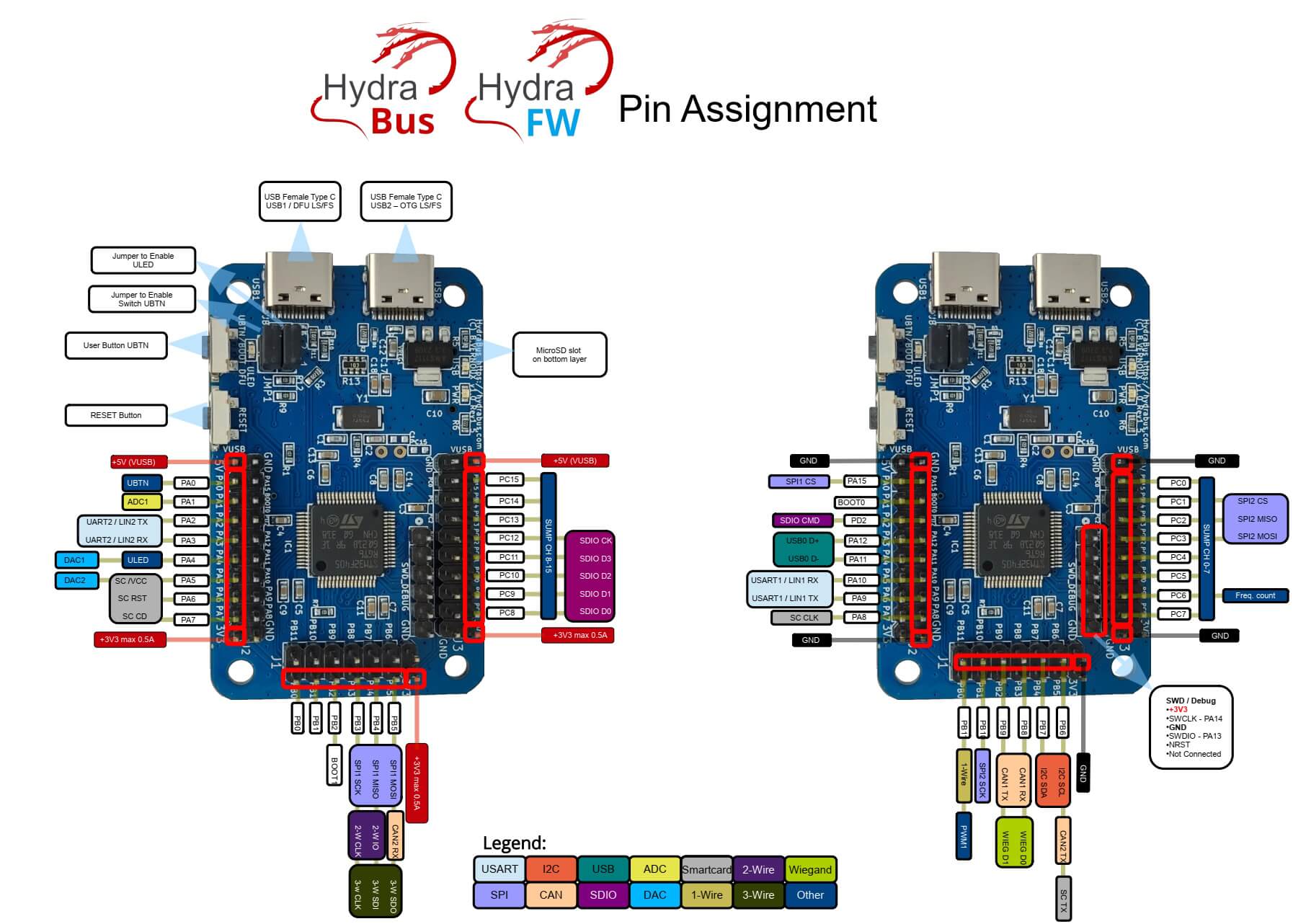
show pins
Syntax#
| Value | Description |
|---|---|
| [ | Chip select (CS) active (low) |
| ] | CS disable (high) |
| r | Read one byte by sending dummy byte (0xff). r:1…255 for bulk reads |
| hd | Read one byte by sending dummy byte (0xff). hd:1…4294967295 for bulk reads. Displays a hexdump of the result |
| w | Followed by values to write byte(s). w:1…255 for bulk writes |
| 0b | Write this binary value. Format is 0b00000000 for a byte, but partial bytes are also fine: 0b1001 |
| 0 | Write this Octal value. Format is prefixed by a 0 (values from 000 to 077) |
| " | Write an ASCII-encoded string |
| 0h/0x | Write this HEX value. Format is 0h01 or 0x01. Partial bytes are fine: 0xA. A-F can be lower-case or capital letters |
| 0-255 | Write this decimal value. Any number not preceded by 0x, 0h, or 0b is interpreted as a decimal value |
Examples:
- Read Identification (0x9F):
[ 0x9F r:3 ] - Read Data (0x03) at the address (0x00:3) and read 32 bytes (hd:32)
[ 0x03 0x00:3 hd:32 ]
References#
- HydraBus/HydraFW wiki - Benjamin Vernoux - Jan 21, 2021
- HydraBus v1.0 Specifications - HydraBus
- HydraBus Assembly Video - Lab401 - 30 may 2017
- BlackAlps17: Hydrabus: Lowering the entry fee to the IoT bugfest - Benjamin Vernoux - 2 dec. 2017
- HydraBus - An Open Source Platform - RMLL Sec 2017
- Ph0wn, my first IoT CTF - Part 3 - Sebastien Andrivet - Dec. 19, 2018
- Getting Started with HydraBus flash and use hydrafw on linux - Benjamin Vernoux - 05/02/2024